$51.32
$73.9
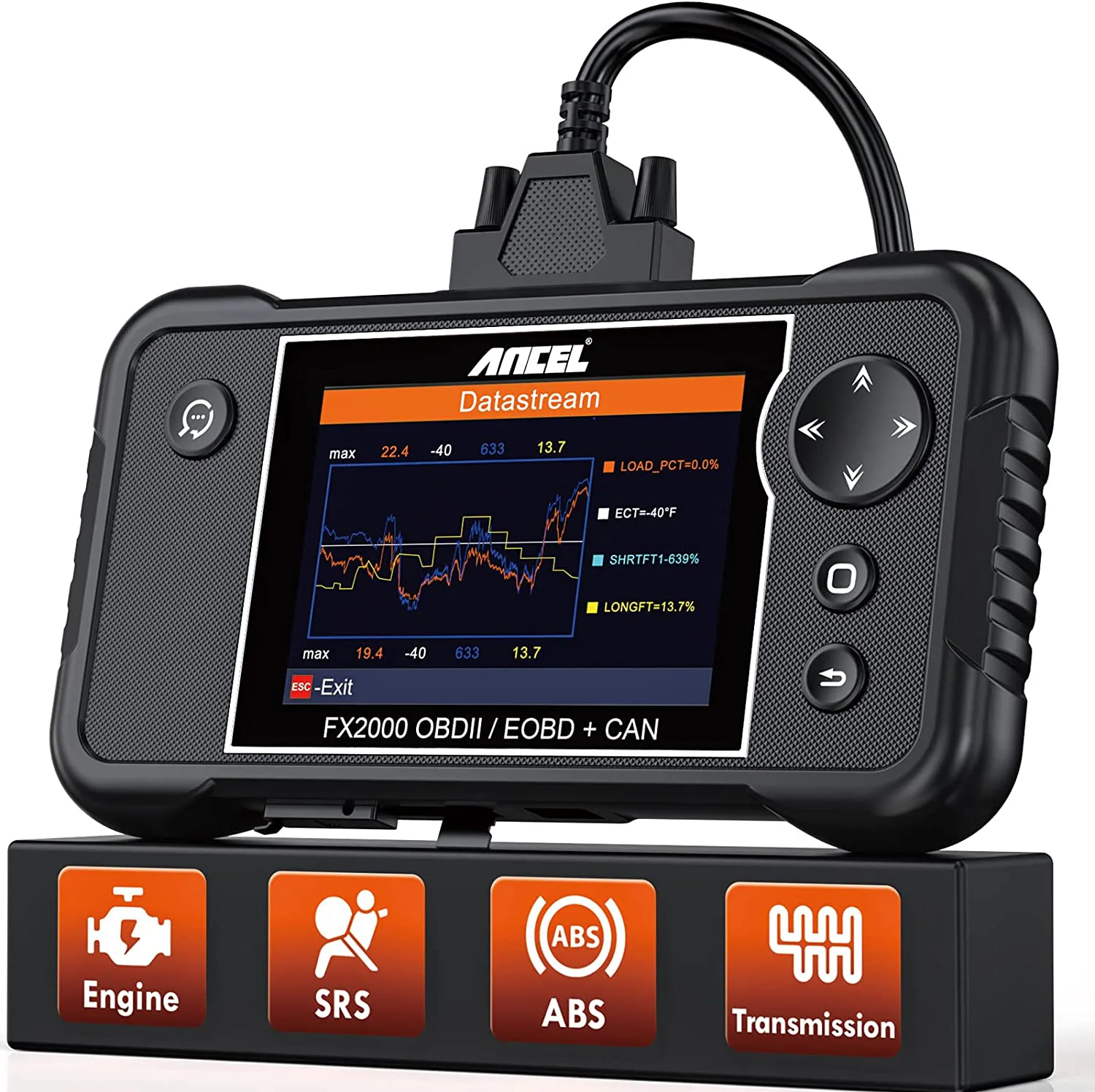
The ANCEL FX2000 Car Diagnostic Tool is a powerful four-system automotive scanner designed to diagnose key vehicle systems including engine, ABS, transmission, and airbag (SRS). It connects directly to a vehicle’s OBD2 port and allows technicians or car owners to quickly identify faults, monitor live data, and clear warning lights. Equipped with a 4-inch TFT color display, the scanner provides clear data visualization and supports real-time graphical data analysis. It is designed for mechanics, automotive technicians, and DIY users who need deeper diagnostics than basic code readers. Key Features 4-System Diagnostics – Diagnose Engine, ABS, SRS (Airbag), and Transmission systems to identify vehicle faults quickly. Full OBD2 Functions – Includes reading and clearing diagnostic trouble codes, freeze-frame data, I/M readiness status, and EVAP system tests. Live Data Graphing – Displays real-time vehicle sensor data in graphical format to help detect abnormal parameters. Turn Off Warning Lights – Clear Check Engine, ABS, and airbag warning lights after repairs. DTC Lookup Library – Built-in fault code definitions help technicians understand error codes quickly. Vehicle Information Retrieval – Displays VIN, calibration ID, and other vehicle details for accurate diagnostics. Diagnostic Capabilities The scanner allows users to perform Read and erase fault codes (DTCs) View live data streams Access freeze-frame data Perform O2 sensor tests Conduct EVAP system tests Check I/M readiness for emissions testing Generate diagnostic reports for troubleshooting Ancel FX 2000 OBD2 Scanner Diagnostic functions: Engine The diagnostic tool can help detect the engine ignition, fuel injection, air and fuel ratio, and exhaust emission conditions in Engine system to enhance vehicle performance, save energy and reduce exhaust emission. Transmission This transmission scanner will read fault codes, display live transmission system data (fluid temperature, fluid pump, clutch actuation, pressure, etc.), and ensures transmission performance is optimal for vehicle speed and load ABS(Anti-lock Brake System) This OBD2 Scanner enables you to diagnose the anti-lock brake system, quickly locate the fault, read fault codes, clear the codes and turn off the warning light after maintenance(if necessary). SRS(Airbag) Diagnostics Reads and clears fault codes in the SRS (Airbag), and turns off the SRS warning light, ensuring the supplemental restraint system is operating safely and properly. OBD2 Functions Full OBD2 test modes for 2005 and newer vehicles Read/Clear Fault Codes: turn-off malfunction indicator light (MIL) O2 Sensor Test: check fuel efficiency and vehicle emission View Freeze Frame: read and display live data stream, plotting functions graphically and store the freeze frame data EVAP Test for fuel tank system (Carbon canister test) Live Data Stream: show the real-time data in text and graph, able to review and replay Display I/M readiness status (Non-continuously monitored system test) On-board Monitor Test: retrieve and display test results for emission-related powertrain components and systems Retrieve Vehicle Identification Number, Calibration ID and Calibration verification number. DTC Help: read fault codes and show the detailed definitions of the codes Live Stream This scan tool can read live data stream for Engine, Transmission, ABS, and SRS. You can select 4 parameters to graph, record and analyze a data stream. Car Brands How to print diagnostic data for the OBD2 Scanner: Make sure “Record Mode” is ON before starting to diagnose your vehicles. After completing diagnostics, connect Ancel FX2000 to a PC via the USB cable. Open the installed software, enter Ancel FX2000 menu “Diagnose” – “Review“- “Upload Record” to upload the data. Click “Print Manager” to access the Scan/Print page, you can save or print the data. Why does not this scan tool save the diagnostic data? Make sure the vehicle’s ignition is on. Make sure that the main menu “Settings” – “Record Mode” is on before you start diagnosing a vehicle. Once the diagnosis is completed, please check the recorded data in the main menu “Review“. How to update Ancel FX2000 OBD2 Scanner USB cable : Please connect the device to a computer via the USB cable. Download the latest update software from ANCEL official website and install it on your computer. Open the update software, select the “USB” connection mode and click “OK” to continue. The “Product Serial Number” will be read automatically. Move to the register page, enter your email address and Register Code will be read automatically, then click “Submit”. Click “Select All” and “Download” to start downloading. Memory Card: Transfer the memory card from the device to the card reader. Plug the card reader into the computer USB port, Please click “download” for the all car brand software. Why does it display “No mobile device was found. Please insert TF card to the device.” The message means that the computer does not recognize the Memory card in the device. Connect the device to a computer via the USB cable. Please note that there will be a 5-second countdown on the device’s screen to indicate if you want to check for a new version. Press OK. What is in the Box: Ancel FX2000 OBDII Cable Memory Card User Manual
Car Diagnostic & Workshop Tools